 Fink
Finki18next
Creates project.inlang/settings.json for your JSON files, including namespaces. i18next guide
npx i18next-cli init --inlangOpen your repository. Edit i18next, next-intl or Paraglide JS translations side by side. Push only what you changed.
Free and open source (MIT) · Set up in one command
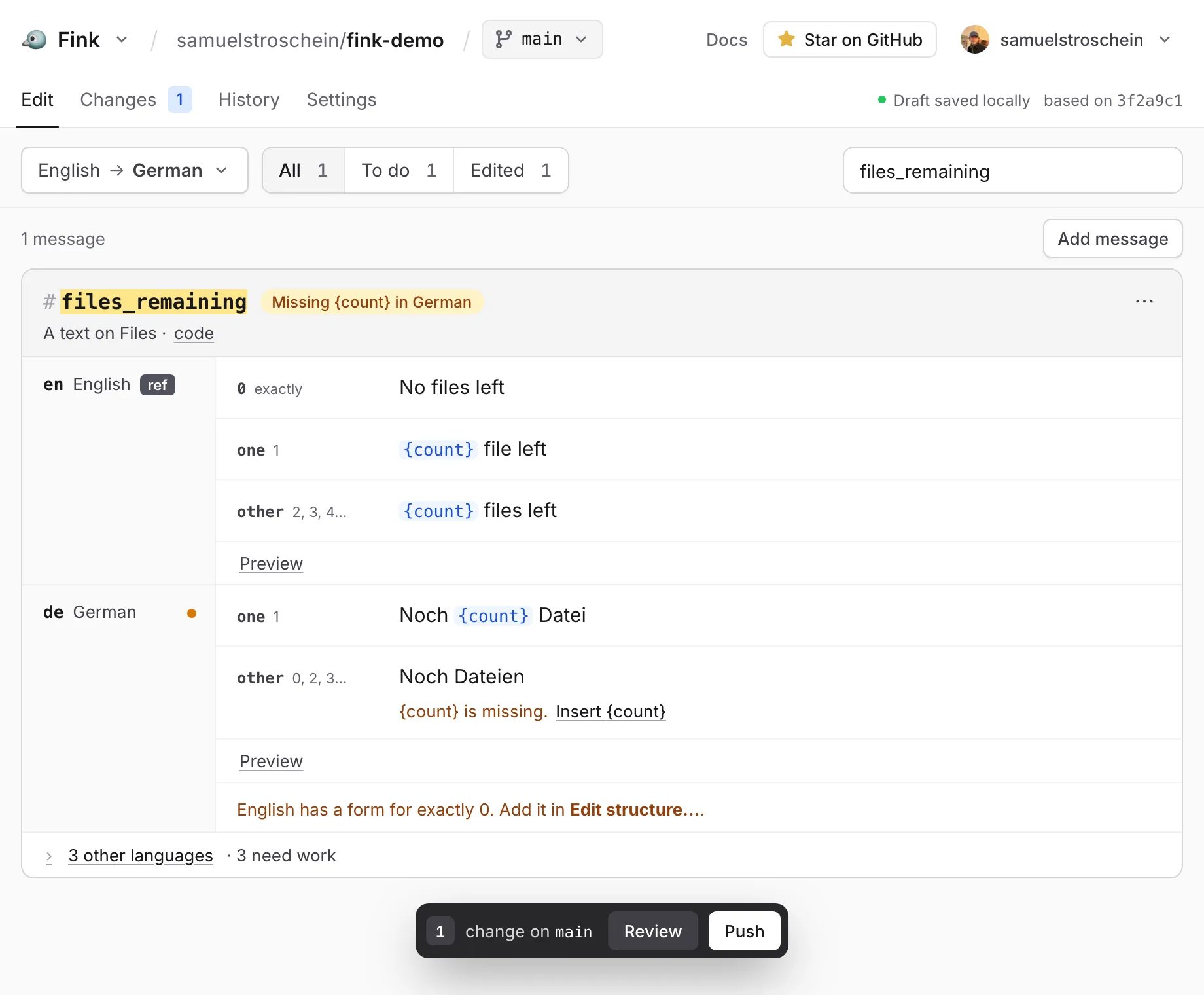
All languages and plural forms of a message in one place.
Missing translations, broken variables and missing plural forms, with one-click fixes.
Only edited messages change. The rest of each file stays byte for byte.
Your repository stays the only copy. No import, no export.
Open source apps that translate with inlang. Open one to try Fink.
Fink reads a small project.inlang folder that lists your languages and where the files are. Your translation files stay as they are.
Creates project.inlang/settings.json for your JSON files, including namespaces. i18next guide
npx i18next-cli init --inlangAdd a project.inlang/settings.json that points at your messages/{locale}.json. Namespaces, plurals and rich text work as they are. next-intl guide
"plugin.inlang.nextIntl": {
  "pathPattern": "./messages/{locale}.json"
}Projects set up with Paraglide JS already have a project.inlang folder. Paraglide JS guide
npx @inlang/paraglide-js@latest initNothing. Fink is free and open source (MIT). Optional hosted services like machine translation may come with inlang Cloud. The editor stays free.
No git. To save changes they need a free GitHub account. Without one they can try edits in their browser, but can't save them. Fink for teams
Yes. Sign in with GitHub and install the Inlang GitHub App on the repositories Fink may use. Getting started
No. Untouched files aren't committed, and in changed files the messages you didn't edit keep their exact formatting. What Fink commits
Yes. Push to a branch you created on GitHub and open a pull request there. People without write access push to a fork and open a pull request. Branches, forks and pull requests