 Fink
FinkYour team edits translations. Nobody touches JSON or git.
Translators and product managers edit your app's text in the browser. Fink checks the text and saves it as a commit on GitHub. Developers review the change like any other commit.
How a change gets into your app
- Translator or PMStep 1Open the link a developer sent you. It opens the project in Fink on the branch the developer chose.
- Translator or PMStep 2Pick your language, choose To do and type the translations. Choose Sign in with GitHub the first time, then Push.
- FinkStep 3Commits your changes to the branch your link opened.
- DeveloperStep 4Opens a pull request on GitHub, checks the changes and merges them.
- DeveloperStep 5Releases a new version of the app with the new text.
When you push, Fink saves your changes as a commit (a saved set of changes) on the branch (a separate line of work in the repository) that your link opened. Fink does not open a pull request. The bottom bar shows the branch name. Don't switch branches in the branch menu unless a developer asks you to.
If your link opens the main branch, your changes are there right away and there is no pull request. Your text still appears in the app only after a developer releases a new version. Fink does not publish anything to the app.
What Fink checks
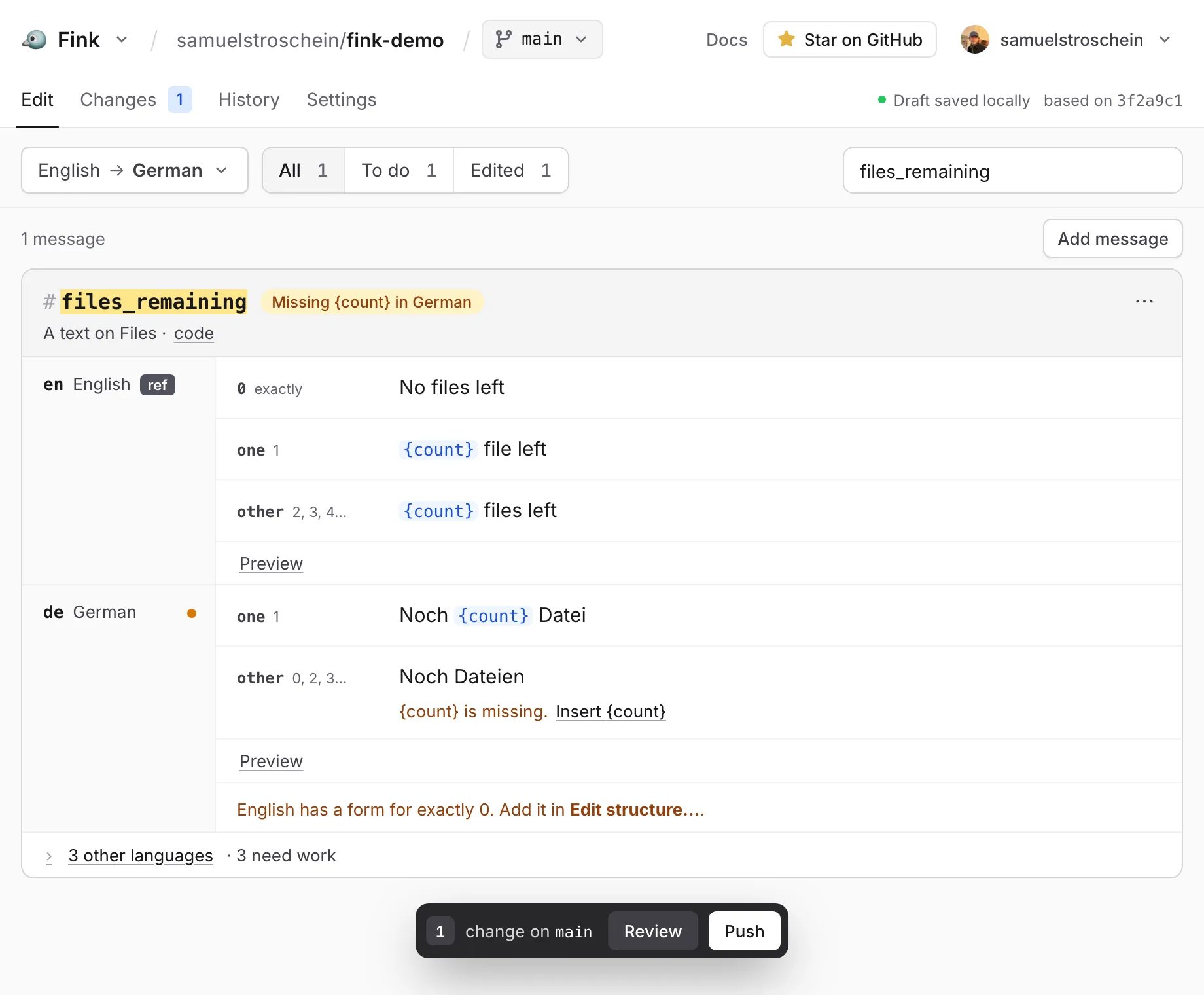
Fink compares each translation with the source text and marks the message. Most warnings have a button that fixes them. You can push with open warnings. See Checks.
- Missing in GermanThe translation is missing or empty.
- Missing {count} in GermanA variable from the source text is missing. Insert {count} adds it.
- 1 form missingA plural form is missing, for example the text for "1 file" or "5 files".
- Unexpected {totl} in FrenchThe translation uses a variable the source text doesn't have. Fink asks: Did you mean {total}?
What each person needs
Translator or PM
A free GitHub account with write access to the repository, and the link a developer sent you. Without write access, the Inlang GitHub App must be installed on your account so Fink can push to your fork. A developer can help with this.Developer
Sets up the project once (one command for i18next, one small file for next-intl, nothing for Paraglide JS), installs the Inlang GitHub App on the repository and sends the translators a link.Viewer
Nothing, for a public repository. Changes stay in that browser and can't be saved.
Fink has no accounts, invitations or roles of its own. GitHub decides who can push. For a private repository, everyone needs a GitHub account with access to it, and the Inlang GitHub App installed on it.
Setup for developers
- Add a
project.inlangfolder to the repository. For i18next, runnpx i18next-cli init --inlang. For next-intl, add one small settings file, see next-intl. Paraglide JS projects already have one. See Set up a project. - Install the Inlang GitHub App on the repository.
- Add translators and PMs as collaborators on GitHub, or let them work through forks.
- Send them a link:
https://fink.inlang.com/?repo=OWNER/REPO&project=project.inlang&branch=BRANCH. Without&branch=, Fink opens the default branch. Fink does not create branches, so create the branch on GitHub first.
Mistakes and undo
- Before you push: undo with ⌘Z or Ctrl+Z in the same browser tab, or edit the text again. Nothing is on GitHub yet.
- After you push: edit the text again and push again. A developer can also undo the commit on GitHub.
Before you push, Review shows each changed text before and after. Only the files you changed are committed, and only the texts you edited change in them.
Protected branches and forks
- Protected branch: If the branch requires pull requests on GitHub, for example a protected main branch, the push fails. Ask the developer for another branch, such as
translations. - No write access: The bottom bar shows Fork. Choose it. Fink makes a copy of the project in your GitHub account (a fork). Choose Push. Fink then shows Open pull request, a link to GitHub's pull request page. You submit the pull request on GitHub.
Limits
- Everyone who saves changes needs a GitHub account.
- Only repositories on github.com.
- Only i18next JSON, next-intl and Paraglide JS (inlang message format) files. See Supported formats.
- No comments, screenshots or translation memory. Machine translation is not available yet.
Fink is free and open source (MIT).
Try Fink on your repository
Free and open source (MIT). Sign in with GitHub to push.
Send this link to your translators: fink.inlang.com/?repo=owner/repo&project=project.inlang&branch=translations